Structured Ophthalmology CPD for Veterinary Surgeons in Clinical Practice
A practical 22-module CPD programme designed to help veterinary surgeons become more confident and structured when diagnosing and managing ophthalmology cases in general practice.
This programme focuses on real clinical decision-making, not theory-heavy learning and is built to improve how you handle eye cases in everyday practice.
Ophthalmology cases are frequent in general practice, but often difficult to manage confidently.
Common challenges include:
In most cases, the difficulty is not knowledge, it is applying a structured, confident clinical approach in real time.
This CPD programme is designed to help you move from uncertainty to structured decision-making.
You will be able to:
22 structured modules covering the ophthalmology cases you see most in practice:
Every module is built around real clinical cases, not abstract theory.
Revisit all content whenever you need it in practice.
Every topic is taught through real clinical scenarios.
Designed specifically for first-opinion veterinary practice.
Clear, focused learning without unnecessary theory.
Useful for revision and day-to-day reference.
Direct access to Dr Tamir Spiegel for clinical questions.
Suitable for professional CPD requirements.
Dr Tamir Spiegel BVMS MRCVS
Diplôme École d’Ophthalmologie ENVA
Dr Spiegel graduated from the University of Glasgow in 2001 and has over 15 years of advanced clinical and surgical experience in veterinary ophthalmology.
He completed the National French Certificate in Ophthalmology in 2011 and is the founder of Vision Vet, providing referral ophthalmology services and ophthalmic education across the UK.
Available worldwide.
£595 one-time payment
You receive immediate access to the full 22-module programme for 24 months.
If ophthalmology cases in practice sometimes feel uncertain or time-pressured, this programme is designed to give you a structured way to approach them with more confidence and clarity.
Secure your access today.

In this overview, we will delve into the importance of conducting ophthalmic examinations in animals, emphasizing the significance of early detection and prevention of eye diseases in animals.
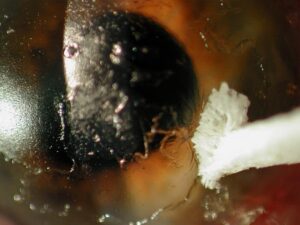
A non-healing corneal ulcer in dogs is an ocular condition that requires vet attention and appropriate treatment. The lesson aims to provide a comprehensive understanding of non-healing corneal ulcers in dogs, covering the causes, symptoms, diagnosis and treatment options.
This lesson aims to provide a comprehensive understanding of canine glaucoma, covering its causes, symptoms, diagnosis and management strategies. Participants will gain insights into the importance of early detection and appropriate intervention to preserve vision and manage this sight-threatening condition in dogs.
This lesson aims to deepen participants’ understanding of canine uveitis, exploring its causes, clinical manifestations, diagnostic methods and therapeutic strategies. By the end of the lesson, learners will be equipped to identify, manage, and contribute to the prevention of uveitis in dogs.
Welcome to "Mastering Third Eyelid Protrusion in Canines," an illuminating webinar course designed to equip veterinary professionals with the expertise needed to understand, diagnose and manage this often perplexing ocular condition in dogs.
Welcome to "Understanding Canine Dry Eyes," an insightful webinar course designed to equip veterinarians with the knowledge and skills necessary to effectively manage and treat this common ocular condition in dogs.
Enhance your veterinary skills with our CPD course on diagnosing and managing eyelid masses in dogs and cats. Learn about common types, diagnostic techniques and treatment options to ensure optimal ocular health for your patients.
Join us for an informative webinar focused on common eyelash disorders in dogs: distichiasis, trichiasis and ectopic cilia. These conditions can cause significant discomfort if left untreated. We'll explore their causes, symptoms, diagnosis and treatment options to help vets better understand and manage these eye conditions.
This webinar will explore chronic epiphora, a condition causing excessive tearing in dogs. We'll discuss the underlying causes, including anatomical, environmental, and health-related factors, along with diagnostic techniques and treatment options.
Learn to identify, diagnose and manage stromal and deep corneal ulcers in canine patients. We’ll cover causes, clinical signs, treatment options and when to refer—giving you practical tips for confident case management.
Welcome to today's webinar on Chronic Superficial Keratitis (CSK) in dogs, also known as Pannus. This immune-mediated condition affects the cornea and, if untreated, can lead to vision loss. We'll explore its causes, symptoms and treatment options to help manage this condition effectively. Let's get started!
Welcome to today’s webinar on eosinophilic Keratoconjunctivitis in Cats. This session will provide an overview of this immune-mediated eye condition, covering its clinical signs, causes, diagnostic methods and effective treatment options. Our goal is to help veterinary professionals manage this chronic disease and improve outcomes for affected cats. Let's dive in!
Welcome to our webinar on Chronic Feline Keratitis, a persistent and often challenging eye condition in cats. In this session, we'll explore the causes, clinical signs and management strategies for chronic keratitis, focusing on how to effectively diagnose and treat this inflammatory corneal disease. Our goal is to provide insights that can help improve long-term outcomes and comfort for affected feline patients. Let’s get started!
This session covers the causes, clinical signs, diagnosis and treatment of feline uveitis. Get practical tips to manage cases effectively and improve outcomes for your feline patients.
Understand the causes, clinical signs and progression of feline glaucoma. Learn how to diagnose it early, manage intraocular pressure and support long-term eye health in your feline patients.
The Canine Lens Luxation webinar is a comprehensive course designed for veterinary professionals, focusing on the diagnosis, management and treatment of lens luxation in dogs.
This course provides veterinary professionals with a comprehensive overview of canine cataracts, covering their causes, clinical signs, and progression. Participants will learn how to diagnose cataracts using advanced diagnostic techniques, differentiate them from other ocular conditions and assess their impact on vision and overall health. The course also explores treatment options, including medical management and surgical intervention, with a focus on postoperative care and client communication.
Explore the common causes, clinical signs and effective management of dacryocystitis in rabbits. Learn practical approaches to diagnosis, flushing techniques and long-term care strategies.
Join us for an informative session on entropion and ectropion, two common eyelid disorders affecting pets. Learn to identify the signs, understand the causes and explore treatment options, including medical management and surgical correction.
Join us for an in-depth webinar on exophthalmia in dogs, a condition characterized by abnormal protrusion of the eyeball. This session will cover common causes, clinical signs, diagnostic approaches and treatment options, including medical and surgical management.
Join us for a deep dive into retinal detachment in dogs and cats—how to recognize the signs, diagnose effectively and explore treatment options.
Join us for a webinar on Horner’s Syndrome, a neurological condition affecting the eye and facial muscles in animals. We’ll cover the key clinical signs, common causes and diagnostic approaches, helping you differentiate peripheral from central lesions. Gain valuable insights to streamline your diagnostic process and improve patient outcomes.



Whether you're hosting employee trainings, student lectures or global conferences, BookYourWebinar is the trusted all-in-one platform that connects you with your audience.
Host professional webinars and structured courses from start to finish on one easy-to-use platform. We handle the tech so you can focus on delivering an impact.
Engage your audience with interactive polls, live Q&A and breakout rooms. Use powerful analytics to track student progress and uncover key insights.
From intimate classes to global events, scale with confidence. Enjoy crystal-clear audio and HD video streaming for uninterrupted sessions.
Engage any class size with interactive virtual classrooms and recorded, on-demand lessons.
Easily track attendance, grade assignments and measure engagement with post-session reports.
Foster teamwork with Breakout Rooms and reward student learning with automated certificates.
Keep students engaged with virtual hand-raising, advanced whiteboarding and real-time feedback.
Sell tickets to premium live webinars or offer paid, structured online courses directly.
Capture valuable prospect data and prove direct ROI with deep engagement analytics.
Produce professional events with custom branding, video uploads and spotlight modes.
Drive attendance with automated emails and convert leads with targeted follow-ups.
Host interactive hybrid town halls and global all-hands meetings to align your company.
Streamline onboarding with structured courses and verify employee skill development.
Ensure active engagement with live polling, live Q&A sessions and interactive whiteboards.
Automatically record your internal updates and share them instantly with teams across time zones.
The Course Builder is an intuitive tool designed to help you create attractive and useful online courses and webinars for your students from start to finish. Follow the steps below to build your first course.
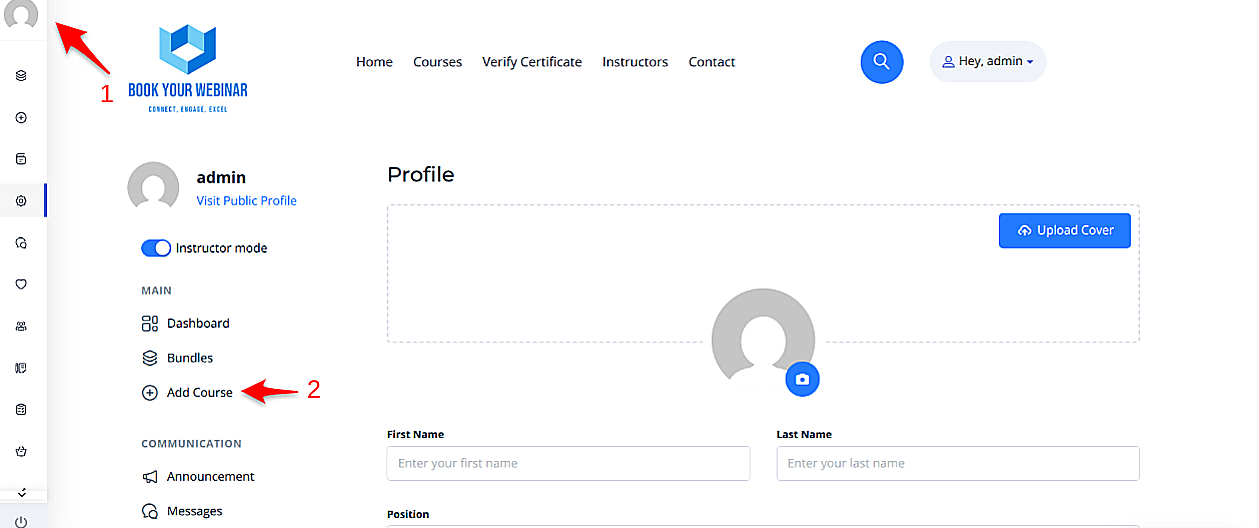
To begin, simply navigate to your personal profile page on the platform and click the Add New Course button. This will open up the main builder environment where you can manage all your content.
Once inside the builder, you will need to provide essential details. This information gives potential students a clear understanding of your content and helps them make an informed decision to enroll.
After filling out the main information, click the Create button to unlock the curriculum and settings tabs.

A successful course is divided into logical sections. This structures the content clearly, making it easier for learners to navigate and understand the flow of the topics.

Navigate to the Settings tab to manage how and when students interact with your content.

Reward your students and customize the look of your landing page.

The Pricing section lets you define how learners will access your content. You can set your course to be completely free to build an audience, or charge a fee to monetize your expertise.

Ensure your students have all the information they need.