Virtual Courses

Learn from Experts – Anytime, Anywhere.

Expert-Led Webinars

Learn from top professionals with real-world experience.

Interactive Learning

Engage with experts through Q&As and discussions.

On-Demand & Live Sessions

Join live sessions or watch anytime at your convenience.

Affordable & Flexible

Learn at your own pace without breaking the bank.

Certificate of Completion

Showcase your expertise and boost your skills to advance your career.

Trusted by Professionals

Learners and experts rely on us to grow their skills.

Get Started

Explore, Learn, Grow From Our Collection of Courses!

  1.  Browse Webinars – Explore a variety of topics taught by industry experts.
  2.  Buy & Access Instantly – Purchase webinars and start learning right away.
  3.  Engage & Grow – Interact with the experts and level up your skills.

Become an Instructor

Interested In Selling A Course?

Turn your knowledge into a profitable opportunity by selling your webinars. Our easy-to-use platform allows you to upload your content, set your own price and start earning right away. Whether you’re offering live sessions or on-demand content, you can grow your brand, expand your professional network and build a steady income stream. Join us today and showcase your expertise to the world! Note: When you sign up, you will get an email within 3 business days informing you whether your application has been approved.

Launch Yourself Into The Future.

Invest in your future today, and start learning from the best in the industry. The knowledge you gain now could be the key to unlocking your next big achievement. Don’t wait – your future is waiting for you!

Book Your Webinar – Learn From Experts. Anytime, Anywhere.

Copyright © 2026 Book Your Webinar. All Rights Reserved.

Company’s registered name: Tamir Spiegel Ltd number: 07073282

* Book Your Webinar is not currently VAT registered. However, once the company completes VAT registration, VAT will be added to the prices.
✨ The Ultimate LMS & Webinar Platform

Successful webinars
start here.

Whether you're hosting employee trainings, student lectures or global conferences, BookYourWebinar is the trusted all-in-one platform that connects you with your audience.

All-in-one platform

Host professional webinars and structured courses from start to finish on one easy-to-use platform. We handle the tech so you can focus on delivering an impact.

Complete engagement

Engage your audience with interactive polls, live Q&A and breakout rooms. Use powerful analytics to track student progress and uncover key insights.

Reliable & Scalable

From intimate classes to global events, scale with confidence. Enjoy crystal-clear audio and HD video streaming for uninterrupted sessions.

Your Webinar Platform, Worldwide

Reach Every Student

Engage any class size with interactive virtual classrooms and recorded, on-demand lessons.

Track Progress

Easily track attendance, grade assignments and measure engagement with post-session reports.

Collaboration & Certification

Foster teamwork with Breakout Rooms and reward student learning with automated certificates.

Interactive Learning

Keep students engaged with virtual hand-raising, advanced whiteboarding and real-time feedback.

Monetize Your Audience

Sell tickets to premium live webinars or offer paid, structured online courses directly.

Generate Leads

Capture valuable prospect data and prove direct ROI with deep engagement analytics.

Brand Experience

Produce professional events with custom branding, video uploads and spotlight modes.

Automate Campaigns

Drive attendance with automated emails and convert leads with targeted follow-ups.

Connect Your Workforce

Host interactive hybrid town halls and global all-hands meetings to align your company.

Training & Development

Streamline onboarding with structured courses and verify employee skill development.

Foster Participation

Ensure active engagement with live polling, live Q&A sessions and interactive whiteboards.

Record & Share

Automatically record your internal updates and share them instantly with teams across time zones.

All of this power

One affordable flat fee for unlimited access.

Instructor Access

Unlimited Plan

£50 / month
  • Capacity & Duration: Max 300 participants per live session, up to 30 hours (you can contact us for more participants).
  • Unlimited Events: Host as many meetings and webinars as you want with no caps.
  • In-Session Tools: Unlimited Whiteboards, Team Chat and AI Companion included.
  • Accessibility: Automated Captions and Local Recording straight to your machine.
  • Monetize: Sell tickets to your webinars & structured courses directly.
  • Award Certificates: Automatically issue custom completion certificates.
  • Revenue Split: You keep 70% of sales (We take 30% to cover tech & platform costs).

Instructor Dashboard

ACTIVE

Welcome to the Course Builder

The Course Builder is an intuitive tool designed to help you create attractive and useful online courses and webinars for your students from start to finish. Follow the steps below to build your first course.

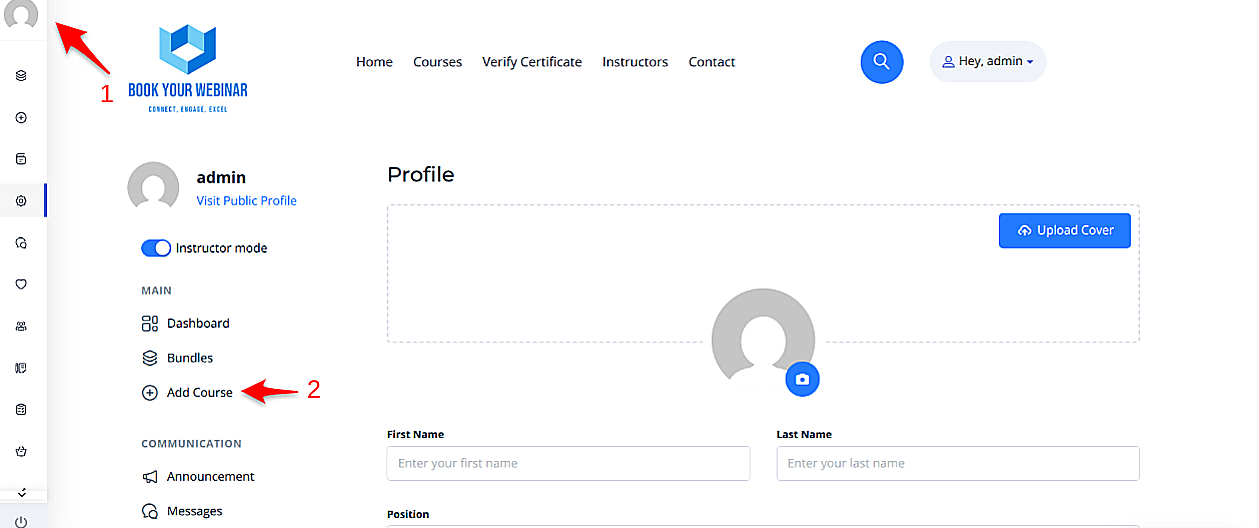
1. Starting Your Course

To begin, simply navigate to your personal profile page on the platform and click the Add New Course button. This will open up the main builder environment where you can manage all your content.

Adding a New Course

2. Course Information

Once inside the builder, you will need to provide essential details. This information gives potential students a clear understanding of your content and helps them make an informed decision to enroll.

  • Title & URL: Give your course a clear, engaging name.
  • Category & Level: Categorize your course appropriately and assign a difficulty level (e.g., Beginner, Intermediate).
  • Cover Image: Upload a high-quality cover photo to make your course visually appealing in the directory.

After filling out the main information, click the Create button to unlock the curriculum and settings tabs.

Course Information Panel

3. Building the Curriculum

A successful course is divided into logical sections. This structures the content clearly, making it easier for learners to navigate and understand the flow of the topics.

  • Add Sections: Group your content into broad modules or weeks.
  • Add Lessons & Assessments: Under each section, add specific video lessons, text documents, interactive polls, or quizzes.
  • Search Materials: Use the "Search materials" button to quickly locate and incorporate previously created lessons or quizzes without having to rebuild them from scratch.
Building the Curriculum

4. Course Settings & Access Control

Navigate to the Settings tab to manage how and when students interact with your content.

  • Access Time Limit: Set an expiration date (e.g., course expires 30 days after enrollment). Students will be notified as the expiration date approaches.
  • Prerequisites: Require students to complete another one of your courses before they are allowed to enroll in this one.
  • Course Files: Attach downloadable materials (PDFs, Worksheets, Slide decks) that students can access alongside the course video.
Access and Settings

5. Certificates & Page Style

Reward your students and customize the look of your landing page.

  • Certificates: Choose from a selection of pre-made certificates. When a student completes 100% of the curriculum, they will automatically be issued this certificate.
  • Course Page Style: Override the platform's default layout for this specific course. Choose between Classic, Modern, Minimalistic, or Bold layouts to best suit your content.
Assigning Certificates

6. Pricing Your Course

The Pricing section lets you define how learners will access your content. You can set your course to be completely free to build an audience, or charge a fee to monetize your expertise.

  • Free: Anyone registered on the platform can enroll instantly.
  • One-Time Purchase: Charge a flat fee for lifetime (or time-limited) access. You can also configure a temporary Sale Price with start and end dates.
  • Subscriptions: Charge a recurring monthly or annual fee for access to the course.
  • Group Pricing: Offer discounted bundle pricing for enterprise or group enrollments.
Course Pricing Options

7. FAQs & Notices

Ensure your students have all the information they need.

  • FAQs: Add a list of Frequently Asked Questions to the course landing page to preemptively address common doubts and reduce support queries.
  • Notices: Use the Announcements feature to communicate important course-related updates, schedule changes, or welcome messages to enrolled students.
Adding FAQs

Recent Invoices

Fetching official Stripe invoices...

Subscription

Cancel Subscription

We’re sorry to see you go. Before you cancel, please take a moment to set all of your courses to Draft status so they are no longer visible on the platform.

If any courses remain active or published after cancellation, your account may continue to be billed at the standard rate of £50 per month, and any paid course earnings will be allocated to Book Your Webinar.

If you need any help with this process, we’re here to support you.