
Leverage AI to Generate Leads, Close More Deals & Boost Revenue
Transform the way you sell with the power of Artificial Intelligence.
The AI-Powered Sales Masterclass is a practical, results-focused course designed to help sales professionals, entrepreneurs, and business owners harness AI to attract better leads, personalise customer engagement, streamline sales activities, and close more deals.
Discover how to use AI tools throughout the entire sales process—from identifying potential customers and creating compelling outreach messages to handling objections, improving follow-ups, and increasing conversions.
Through six practical modules, you’ll learn how to work smarter, save time, and build a more efficient, AI-powered sales system that supports sustainable revenue growth.
Generate High-Quality Leads: Use AI to identify ideal customers, research prospects, and qualify sales opportunities.
Create Smarter Sales Outreach: Write personalised emails, messages, and follow-ups that capture attention and encourage responses.
Improve Sales Conversations: Use AI to prepare persuasive pitches, understand customer needs, and confidently handle objections.
Close More Deals: Recognise buying signals, strengthen negotiation strategies, and improve conversion opportunities.
Automate Your Sales Process: Reduce repetitive tasks, streamline follow-ups, and integrate AI into your CRM and daily workflow.
Build Your AI Sales System: Develop a practical action plan to apply AI across your sales activities and drive business growth.
This masterclass is ideal for sales professionals, business owners, entrepreneurs, sales managers, business development executives, and anyone looking to use AI to improve sales productivity and performance.
No advanced technical knowledge or AI experience is required.
By the end of this course, you’ll have a clear understanding of how to apply AI at every stage of the sales journey, practical techniques you can implement immediately, and an actionable framework for building a smarter, more effective sales process.
Stop spending more time on manual sales tasks. Start using AI to sell smarter, engage better, and grow faster.



Whether you're hosting employee trainings, student lectures or global conferences, BookYourWebinar is the trusted all-in-one platform that connects you with your audience.
Host professional webinars and structured courses from start to finish on one easy-to-use platform. We handle the tech so you can focus on delivering an impact.
Engage your audience with interactive polls, live Q&A and breakout rooms. Use powerful analytics to track student progress and uncover key insights.
From intimate classes to global events, scale with confidence. Enjoy crystal-clear audio and HD video streaming for uninterrupted sessions.
Engage any class size with interactive virtual classrooms and recorded, on-demand lessons.
Easily track attendance, grade assignments and measure engagement with post-session reports.
Foster teamwork with Breakout Rooms and reward student learning with automated certificates.
Keep students engaged with virtual hand-raising, advanced whiteboarding and real-time feedback.
Sell tickets to premium live webinars or offer paid, structured online courses directly.
Capture valuable prospect data and prove direct ROI with deep engagement analytics.
Produce professional events with custom branding, video uploads and spotlight modes.
Drive attendance with automated emails and convert leads with targeted follow-ups.
Host interactive hybrid town halls and global all-hands meetings to align your company.
Streamline onboarding with structured courses and verify employee skill development.
Ensure active engagement with live polling, live Q&A sessions and interactive whiteboards.
Automatically record your internal updates and share them instantly with teams across time zones.
The Course Builder is an intuitive tool designed to help you create attractive and useful online courses and webinars for your students from start to finish. Follow the steps below to build your first course.
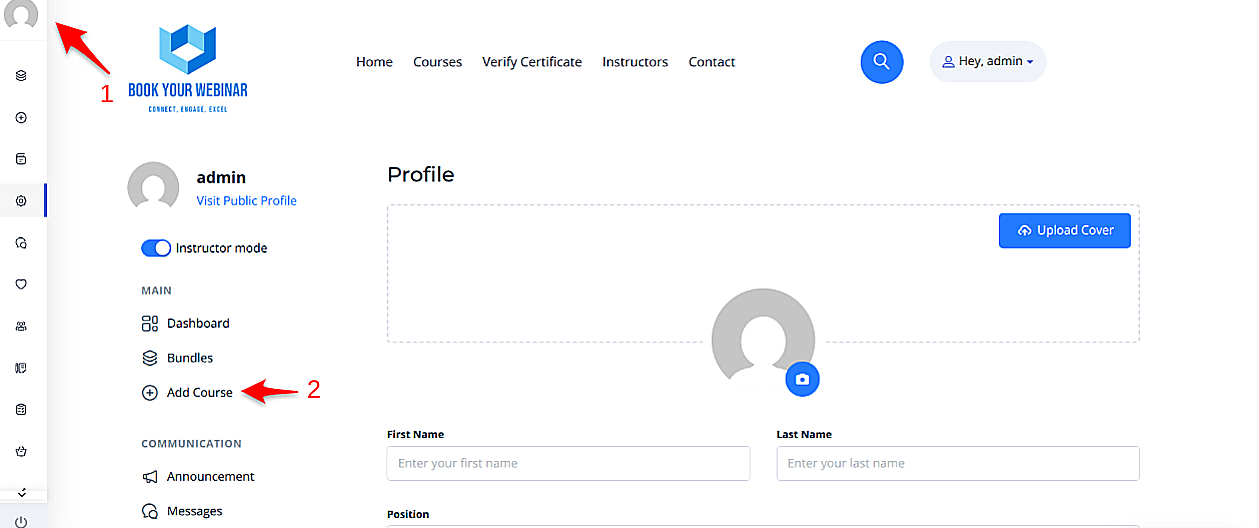
To begin, simply navigate to your personal profile page on the platform and click the Add New Course button. This will open up the main builder environment where you can manage all your content.
Once inside the builder, you will need to provide essential details. This information gives potential students a clear understanding of your content and helps them make an informed decision to enroll.
After filling out the main information, click the Create button to unlock the curriculum and settings tabs.

A successful course is divided into logical sections. This structures the content clearly, making it easier for learners to navigate and understand the flow of the topics.

Navigate to the Settings tab to manage how and when students interact with your content.

Reward your students and customize the look of your landing page.

The Pricing section lets you define how learners will access your content. You can set your course to be completely free to build an audience, or charge a fee to monetize your expertise.

Ensure your students have all the information they need.