• Description
  • Curriculum
  • FAQ

This webinar will explore chronic epiphora, a condition causing excessive tearing in dogs. We’ll discuss the underlying causes, including anatomical, environmental, and health-related factors, along with diagnostic techniques and treatment options.

Who Is This Course For?

Whether you’re a veterinary student, a recent graduate, or an experienced practitioner pursuing further qualifications, this course is designed with you in mind. It aims to enhance your understanding and boost your confidence in diagnosing and managing ophthalmic cases, no matter your current level of experience.

Meet the Speaker

Dr. Tamir Spiegel BVMS MRCVS, Diplôme École d’Ophthalmologie ENVA

Dr. Tamir Spiegel earned his veterinary degree from the University of Glasgow in 2001. Since then, he has worked across a wide variety of practices throughout the UK, including time with the RSPCA. In 2011, he completed the National French Certificate in Ophthalmology, further expanding his expertise in the field.

His passion for ophthalmology took root in 2004 and developed further during his time at a major referral hospital in Manchester, where he gained valuable clinical and surgical experience. In 2009, he launched Vision Vet, a mobile referral service offering advanced eye care to veterinary practices across the UK.

Now based in Scotland, Dr. Spiegel is dedicated to providing high-quality, compassionate ophthalmic care. He takes a thorough yet practical approach to case management, with a strong focus on delivering effective outcomes through the least invasive methods.

Who is it for?
This course is designed for veterinarians of all levels, including veterinary students and those studying for a certificate. It aims to provide comprehensive knowledge and skills necessary for their professional development in the field.
What is the number of CPD hours?
The webinar includes approximately 45 minutes of content.
What is the venue?
This course is delivered in the form of a recorded lecture.
How much it costs?
The webinar is priced at £55 excluding VAT, with occasional promotions offering discounts.
How long do you have access to the course?
You can access the course for one year.
Certificate included
9. Chronic Epiphora
Course available for 365 days
Course details
Duration 45 minutes
Lectures 1
Video 45 minutes
Level All Levels

Recent Posts

    Recent Comments

    No comments to show.
    ✨ The Ultimate LMS & Webinar Platform

    Successful webinars
    start here.

    Whether you're hosting employee trainings, student lectures or global conferences, BookYourWebinar is the trusted all-in-one platform that connects you with your audience.

    All-in-one platform

    Host professional webinars and structured courses from start to finish on one easy-to-use platform. We handle the tech so you can focus on delivering an impact.

    Complete engagement

    Engage your audience with interactive polls, live Q&A and breakout rooms. Use powerful analytics to track student progress and uncover key insights.

    Reliable & Scalable

    From intimate classes to global events, scale with confidence. Enjoy crystal-clear audio and HD video streaming for uninterrupted sessions.

    Your Webinar Platform, Worldwide

    Reach Every Student

    Engage any class size with interactive virtual classrooms and recorded, on-demand lessons.

    Track Progress

    Easily track attendance, grade assignments and measure engagement with post-session reports.

    Collaboration & Certification

    Foster teamwork with Breakout Rooms and reward student learning with automated certificates.

    Interactive Learning

    Keep students engaged with virtual hand-raising, advanced whiteboarding and real-time feedback.

    Monetize Your Audience

    Sell tickets to premium live webinars or offer paid, structured online courses directly.

    Generate Leads

    Capture valuable prospect data and prove direct ROI with deep engagement analytics.

    Brand Experience

    Produce professional events with custom branding, video uploads and spotlight modes.

    Automate Campaigns

    Drive attendance with automated emails and convert leads with targeted follow-ups.

    Connect Your Workforce

    Host interactive hybrid town halls and global all-hands meetings to align your company.

    Training & Development

    Streamline onboarding with structured courses and verify employee skill development.

    Foster Participation

    Ensure active engagement with live polling, live Q&A sessions and interactive whiteboards.

    Record & Share

    Automatically record your internal updates and share them instantly with teams across time zones.

    All of this power

    One affordable flat fee for unlimited access.

    🎉 Use code 75OFF to get 75% off your first month, limited time only!
    Instructor Access

    Unlimited Plan

    £50 / month
    • Capacity & Duration: Max 300 participants per live session, up to 30 hours (you can contact us for more participants).
    • Unlimited Events: Host as many meetings and webinars as you want with no caps.
    • In-Session Tools: Unlimited Whiteboards, Team Chat and AI Companion included.
    • Accessibility: Automated Captions and Local Recording straight to your machine.
    • Monetize: Sell tickets to your webinars & structured courses directly.
    • Award Certificates: Automatically issue custom completion certificates.
    • Revenue Split: You keep 70% of sales (We take 30% to cover tech & platform costs).

    Instructor Dashboard

    ACTIVE

    Welcome to the Course Builder

    The Course Builder is an intuitive tool designed to help you create attractive and useful online courses and webinars for your students from start to finish. Follow the steps below to build your first course.

    1. Starting Your Course

    To begin, simply navigate to your personal profile page on the platform and click the Add New Course button. This will open up the main builder environment where you can manage all your content.
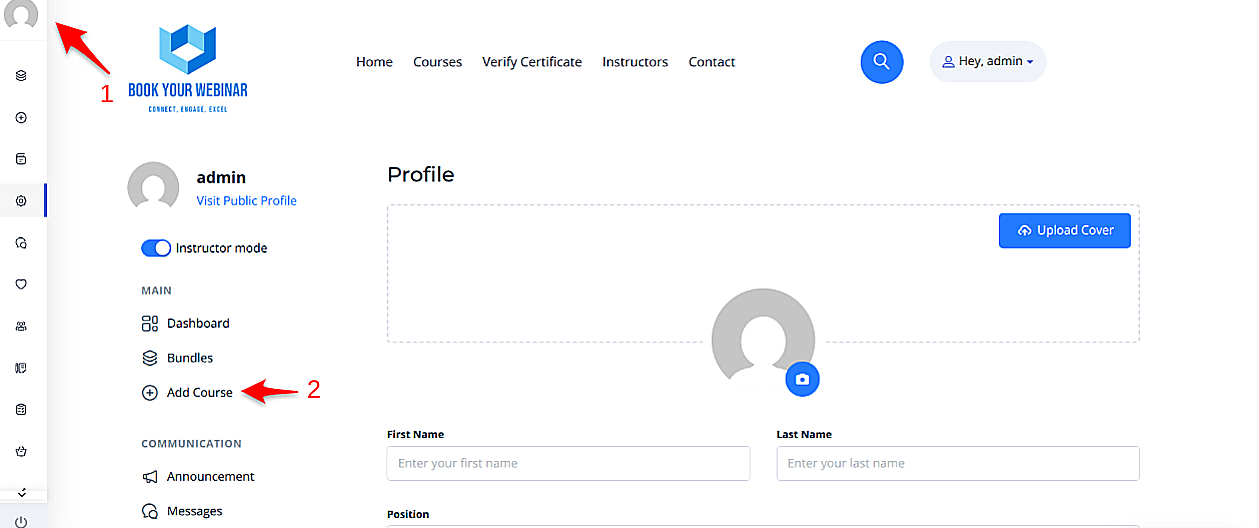
    Adding a New Course

    2. Course Information

    Once inside the builder, you will need to provide essential details. This information gives potential students a clear understanding of your content and helps them make an informed decision to enroll.

    • Title & URL: Give your course a clear, engaging name.
    • Category & Level: Categorize your course appropriately and assign a difficulty level (e.g., Beginner, Intermediate).
    • Cover Image: Upload a high-quality cover photo to make your course visually appealing in the directory.

    After filling out the main information, click the Create button to unlock the curriculum and settings tabs.

    Course Information Panel

    3. Building the Curriculum

    A successful course is divided into logical sections. This structures the content clearly, making it easier for learners to navigate and understand the flow of the topics.

    • Add Sections: Group your content into broad modules or weeks.
    • Add Lessons & Assessments: Under each section, add specific video lessons, text documents, interactive polls, or quizzes.
    • Search Materials: Use the "Search materials" button to quickly locate and incorporate previously created lessons or quizzes without having to rebuild them from scratch.
    Building the Curriculum

    4. Course Settings & Access Control

    Navigate to the Settings tab to manage how and when students interact with your content.

    • Access Time Limit: Set an expiration date (e.g., course expires 30 days after enrollment). Students will be notified as the expiration date approaches.
    • Prerequisites: Require students to complete another one of your courses before they are allowed to enroll in this one.
    • Course Files: Attach downloadable materials (PDFs, Worksheets, Slide decks) that students can access alongside the course video.
    Access and Settings

    5. Certificates & Page Style

    Reward your students and customize the look of your landing page.

    • Certificates: Choose from a selection of pre-made certificates. When a student completes 100% of the curriculum, they will automatically be issued this certificate.
    • Course Page Style: Override the platform's default layout for this specific course. Choose between Classic, Modern, Minimalistic, or Bold layouts to best suit your content.
    Assigning Certificates

    6. Pricing Your Course

    The Pricing section lets you define how learners will access your content. You can set your course to be completely free to build an audience, or charge a fee to monetize your expertise.

    • Free: Anyone registered on the platform can enroll instantly.
    • One-Time Purchase: Charge a flat fee for lifetime (or time-limited) access. You can also configure a temporary Sale Price with start and end dates.
    • Subscriptions: Charge a recurring monthly or annual fee for access to the course.
    • Group Pricing: Offer discounted bundle pricing for enterprise or group enrollments.
    Course Pricing Options

    7. FAQs & Notices

    Ensure your students have all the information they need.

    • FAQs: Add a list of Frequently Asked Questions to the course landing page to preemptively address common doubts and reduce support queries.
    • Notices: Use the Announcements feature to communicate important course-related updates, schedule changes, or welcome messages to enrolled students.
    Adding FAQs

    Recent Invoices

    Fetching official Stripe invoices...

    Subscription

    Cancel Subscription

    We’re sorry to see you go. Before you cancel, please take a moment to set all of your courses to Draft status so they are no longer visible on the platform.

    If any courses remain active or published after cancellation, your account may continue to be billed at the standard rate of £50 per month, and any paid course earnings will be allocated to Book Your Webinar.

    If you need any help with this process, we’re here to support you.